


What an APAP Range Actually Does
Most modern machines ship in auto-adjusting mode (APAP, or AutoSet on ResMed devices). Instead of delivering one fixed pressure, the machine moves between a minimum pressure and a maximum pressure, responding to what it detects in your breathing, such as snoring, flow limitation, and apneas.
The range is a set of guardrails, not a target:
- Minimum pressure is the floor. The machine will not drop below it, even when your breathing looks perfectly stable.
- Maximum pressure is the ceiling. The machine will not go above it, even if events continue.
- Everything in between is the algorithm's working room.
A wide range (for example 4 to 20 cmH2O) gives the algorithm freedom but can also lead to a lot of pressure movement. A narrower range keeps pressure more predictable. Clinicians choose ranges based on diagnosis, history, comorbidities, and comfort, and the AASM's clinical practice guideline on PAP therapy for obstructive sleep apnea (2019) notes that APAP is a reasonable option for many adults without significant comorbidities such as heart failure, significant lung disease, or hypoventilation.
Understanding this setup is what makes the summary numbers on your dashboard interpretable.
Median, 95th Percentile, and Max: Three Different Stories
Your SD card data summarizes pressure in several ways, and each one answers a different question.
- Median (50th percentile): the pressure you spent half the night below. It describes your typical pressure.
- 95th percentile (or 90th on many Philips devices): the pressure you stayed below for 95% of the night. It describes the higher pressures needed during your more demanding stretches, such as REM sleep or back sleeping, while ignoring brief spikes.
- Maximum: the single highest pressure reached, even if only for a moment.
The 95th percentile is generally the most informative figure for judging whether your range suits you. The maximum alone can mislead, because one cough, a mouth leak, or a position change can briefly push pressure up without reflecting your real needs.
A single night is also a small sample. Trends over one to two weeks tell far more than any individual number, since pressure needs shift with sleep position, alcohol, congestion, and sleep stage. CPAP Insights displays these values after SD card import so nightly patterns can be compared side by side.
Patterns Worth Noticing in Your Pressure Data
A few recurring patterns show up often and are worth understanding:
- 95th percentile sits at or near your maximum. The machine may be hitting its ceiling regularly. This can mean the range is limiting the algorithm, but it can also be driven by leak, nasal congestion, or positional factors. It is a flag to investigate, not a conclusion.
- Pressure sits at your minimum most of the night with low residual AHI. This suggests the floor is already adequate. A very low minimum can sometimes mean the machine spends time at pressures that are too low before it responds.
- Large swings through the night. Frequent up-and-down movement may be normal for some people, but it can also coincide with fragmented sleep or awakenings.
- High pressure with rising leak. Higher pressure tends to increase leak, especially with mask seal issues, and leak can then make the data harder to interpret.
- Persistently high pressure with discomfort, such as bloating, air swallowing, or difficulty exhaling, is worth tracking and reporting.
None of these patterns diagnoses anything by itself. They are prompts for better questions, which is where the next step comes in.
Cross-Check Pressure Against Other Signals
Pressure only makes sense in context. The same 95th percentile can mean very different things depending on what else is happening.
Useful companions to review alongside pressure:
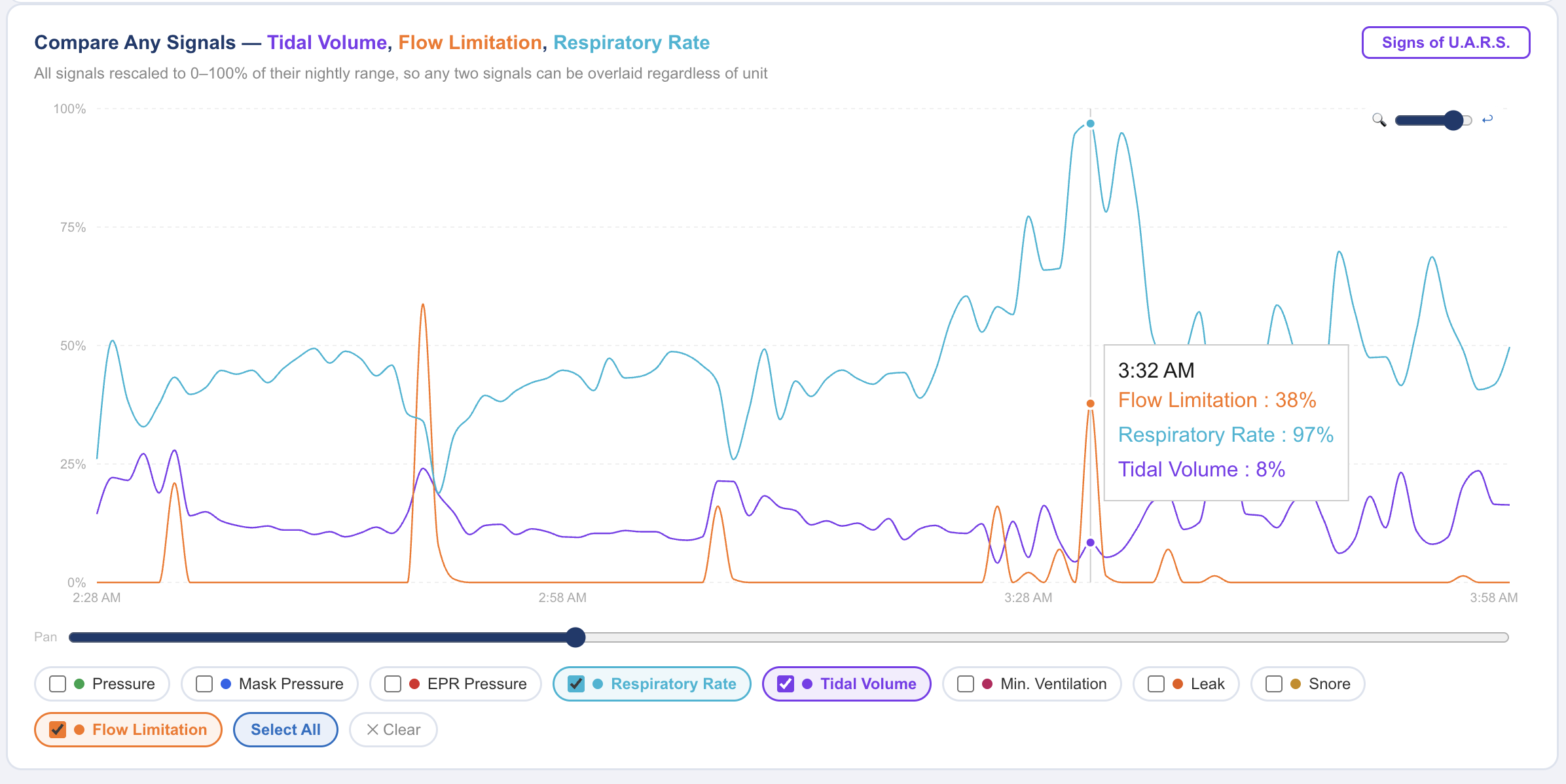
- Flow limitation: if flattened breaths persist even as pressure climbs, that is a different situation than flow limitation that resolves quickly. Flow limitation analysis helps separate the two, and it matters especially for UARS-type patterns where AHI can look excellent.
- Leak rate: unintentional leak can distort what the machine detects, so rule out seal problems before reading much into pressure behavior.
- Residual AHI and event types: a rise in central or unclassified events at higher pressures is something clinicians pay attention to.
- EPR setting: pressure relief changes the inhale/exhale pressure difference, so it affects comfort without changing the underlying therapy pressure.
In CPAP Insights, Build a Graph can overlay pressure, flow limitation, and leak on one timeline. Seeing that pressure rose just after a leak spike, or that flow limitation clustered during a specific stretch, is far more useful than any single summary stat. Sleep Doc AI can also help turn those patterns into plain-language questions.
Taking the Data to Your Sleep Doctor
Pressure range changes are a clinical decision. Adjusting the minimum or maximum on your own, or switching to a fixed pressure based on a 95th percentile figure, can backfire. The right setting depends on your diagnosis, comorbidities, and symptoms, none of which a graph can capture.
A productive appointment starts with specific observations. Consider bringing:
- Your median, 95th percentile, and maximum pressure over the last 2 to 4 weeks
- Whether the 95th percentile regularly touches your maximum
- Residual AHI, flow limitation trends, and leak averages
- Symptoms, including daytime sleepiness, headaches, bloating, or frequent awakenings
- Any comfort issues exhaling or tolerating higher pressures
Questions worth asking include whether your current range still fits your data, whether a narrower range or a different minimum makes sense, and whether any additional testing is warranted if symptoms persist despite a normal AHI.
The numbers are tools for a better conversation. Discuss any changes to your pressure settings with your sleep doctor before making them.